Large Notes Gadget
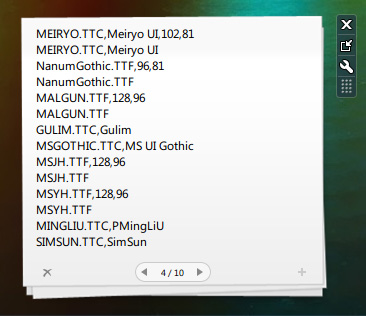
제가 예전부터 수정해서 사용하던 “큰 메모” 가젯을 배포합니다.
뭐 별 특별한 건 없고, 단순히 윈도우 비스타에 기본 포함되어 있는 “메모” 가젯을 확대해서 수정한 버전입니다. 확대했으니, 당연히 한번에 쓸 수 있는 양도 많아지겠죠~♬
보너스로, 선택할 수 있는 폰트의 종류도 늘렸습니다. 기본인 Segoe UI, Segoe Print, Segoe Script에 더해 Malgun Gothic, Meiryo, Microsoft JhengHei, Microsoft YaHei, Arial, Tahoma를 추가했습니다.
처음 수정했을때 시행착오를 거쳐 특별히 깨지거나 하는것 없이 잘 써왔습니다만, 하나 알려진 문제점으로는, 사이드바에 도킹하셨을때 페이징 카운트가 제대로 표시되지 않습니다. 그런데 어차피 사이드바에 도킹해서 쓰실거라면 이 가젯을 받을 필요가 없으시겠죠? ㅎㅎ
윈도우 7에서 정상 작동합니다.
가젯을 실수로 닫았을 경우 내용은 보존되지 않으니 조심하시기 바랍니다.
>> 다운로드 <<
Here’s the “Large Notes” gadget that I’ve been using from some time ago.
Nothing real special, it’s just a modified version of the original “Notes” gadged included in Windows Vista by default. I enlarged the images and the text area to be able to enter more text. (obviously) 😛
As a bonus, I also added some more font choices available in the gadget settings window. Apart from the default fonts Segoe UI, Segoe Print, and Segoe Script, I added Malgun Gothic, Meiryo, Microsoft JhengHei, Microsoft YaHei, Arial, and Tahoma.
When I first modified for my personal use, I tested it countless times to get the right sizes and places for overlaying images, and so far I haven’t noticed any bugs or crashing images while using. One thing I did notice is that when the gadget is docked on sidebar, the note page count is not displayed… but why’re you gonna need this gadget if you’re just gonna keep it in anyways? 😀
Works fine in Windows 7.
In case you accidentally close the gadget and add a new instance of the gadget, your note contents will NOT be recovered. Be advised.
just click on the space (I don't know how I should call it) and drag it onto the desktop!
한국어에서 찾으면 이런 어플이 없었는데 우리나라분이 만드신거보고 놀랐어요 ㅎㅎ
그래도 잘 쓰시고 계신다니 기쁩니다^^
i really needed the notes gadget for windows 7 :)
I have formated my PC, and I had installed your gadget, where I had important information. And I neew to recover the info.
I have all the files from the previous installation.
Where is the data stored?
Thank you.
Nice gadget, anyway.
I've been using the notes and sadly closed the x by mistake! Just for future reference, how do you store the data to the App folder?
Thanks,
Dark
To restore your lost notes data, follow the given steps:
1. Open the sidebar folder, right-click on the settings.ini and bring up the properties window, and go to the Previous Versions tab. If you haven't disabled the default Windows Backup settings, there should be at least 4 backups from the last 4 days.
2. Open up the date you want to restore from, and look for [Section ##] PrivateSetting_gadgetName=" (blablablabla)NotesLarge.Gadget".
3. Copy the entire section from [Section ##] to just before the next [Section ##].
4. Then open the current version of Settings.ini and paste it into the same section (if you haven't yet done so, you must re-open the gadget) look for the NotesLarge.Gadget as before.
5. Save the current Settings.ini file, right-click on the desktop > View > Show Desktop Gadgets (Windows 7) or right-click on Windows Sidebar tray icon > close to exit the sidebar application, then reload the program.
You should see your old notes back up again.
The note gadget is for quick notes, so I suggest you save important notes elsewhere.
사이즈가 커서 용도에 딱입니다. 감사합니다 ㅎ
그런데 혹시 노트 내용을 페이지마다 텍스트파일이나 기타 파일로 저장되게 만드는건 불가능할까요? ㅎ;; 저장기능이 필요해서요;;